
- 분류 전체보기 (9212)

- 공지사항 (29)
- Format&Encrypt (18)
- Java (373)
- C (51)
- C++ (53)
- C샵 (NET) (144)
- Python (240)
- Go Lang (Go 언어) (108)
- Kotlin (568)
- Swift (224)
- Objective-C (200)
- Android (1064)
- IOS (656)
- Flutter (365)
- FrontEnd (112)
- JavaScript (610)
- Jquery (113)
- Http & Api (110)
- VueJs (51)
- AngularJs (10)
- ReactJs (16)
- SE & OS & HW (52)
- DataBase (103)
- OracleDB (202)
- MySqlDB (103)
- MsSqlDB (107)
- Network (115)
- Spring (119)
- NodeJs (227)
- Redis (RDS) (31)
- Aws (Amazon) (241)
- ADB (cmd) (54)
- MacOs (cmd) (28)
- Linux (cmd) (148)
- Window (cmd) (40)
- Office (74)
- Git (깃 & 저장소) (91)
- Library & F.W (128)
- IT 참고 사이트 (170)
- IT 정보 & 소식 (380)
- IT 기술 & 용어 (336)
- 투케이2K 에러관리 (370)
- 투케이2K 업무정리 (249)
- 투케이2K 로직정리 (205)
- 투케이2K 유틸파일 (203)
- 투케이2K 학습정리 (144)
- 투케이2K 알고리즘 (105)
- 투케이2K 일상&생활 (66)
- 투케이2K 생활용어 (6)
투케이2K
241. (Aws/Amazon) [Key Management Service] AWS KMS 키 상세 메타 데이터 조회 DescribeKey API 설명 정리 본문
241. (Aws/Amazon) [Key Management Service] AWS KMS 키 상세 메타 데이터 조회 DescribeKey API 설명 정리
투케이2K 2026. 11. 6. 18:33[개발 환경 설정]
구 분 : 투케이2K / 개발 / IT / 컴퓨터 / 개발자
개발 환경 : Aws / Amazon Web Services
제 목 : [Key Management Service] AWS KMS 키 상세 메타 데이터 조회 DescribeKey API 설명 정리

[API 구조 설명]

[설 명]
// --------------------------------------------------------------------------------------
[개발 및 환경]
// --------------------------------------------------------------------------------------

- 인프라 : Aws / Amazon Web Services


- 기술 구분 : Aws / Key Management Service / DescribeKey


- 사전) 👉 KMS (Key Management Service) 간략 설명 :

  >> 정의 : 데이터를 암호화하거나 복호화할 때 사용하는 '암호화 키(Key)' 자체를 생성하고 관리하는 서비스입니다.

  >> 특징 : 실제 키는 AWS 내부 하드웨어 보안 모듈(HSM)에 보관되며 외부로 노출되지 않습니다. 직접 암복호화 가능한 크기는 최대 4KB 로 제한됩니다.

  >> 한 줄 비유 : 비밀을 잠그고 여는 '열쇠(Key)'


- 사전) 👉 KMS 관리형 키 (AWS Managed Key) 간략 설명 :

  >> 단일 AWS 계정 내에서, 별도의 복잡한 권한 제어나 멀티 계정 공유 없이 빠르고 간편하게 암호화 기능을 쓰고 싶을 때 사용합니다.

  >> Secrets Manager 생성 시 별도의 키를 지정하지 않으면 자동으로 이 방식이 적용되며, 추가 비용이 전혀 들지 않습니다.


- 사전) 👉 KMS 고객 관리형 키 (CMK, Customer Managed Key) 간략 설명 :

  >> 다른 AWS 계정에서 우리 계정의 Secrets Manager(또는 암호화된 데이터)를 조회해야 할 때 사용합니다.

  >> "특정 IP 대역에서만 복호화 허용", "특정 담당자만 키 삭제 가능" 등 정교한 보안 정책 및 규정(컴플라이언스)을 직접 정의해야 할 때 사용합니다.

  >> 보안 사고 발생 시 임의로 키를 비활성화(Revoke)하여 즉시 접근을 차단하는 통제 권한이 필요할 때 사용합니다.

// --------------------------------------------------------------------------------------


// --------------------------------------------------------------------------------------
[설 명]
// --------------------------------------------------------------------------------------

1. DescribeKey 는 👉 특정 AWS KMS 키의 상세 메타데이터를 조회하는 API 입니다.

  >> 키의 실제 암호화 키 (Key Material) 를 반환하는 것이 아니라, 키의 상태와 속성을 확인하기 위한 API 입니다.


2. DescribeKey 의 주요 용도 :

  >> 키가 활성화(Enabled) 상태인지 확인

  >> 키의 ARN, Key ID 확인

  >> 대칭키(Symmetric)인지 비대칭키(Asymmetric)인지 확인

  >> 암호화용 키인지 서명용 키인지 확인

  >> Multi-Region Key 여부 확인

  >> 고객 관리형 키(Customer Managed Key)인지 AWS 관리형 키(AWS Managed Key)인지 확인

  >> 키 삭제 예정 여부 확인


3. 🟦 DescribeKey 호출 Request 전문 :

    POST / HTTP/1.1
    {
        "GrantTokens": [ "string" ],
        "KeyId": "string"
    }

    --------------------------------------------------

    KeyId : 필수 : 조회할 KMS 키

      - KeyId 에는 다음 형식을 사용할 수 있습니다.
      - Key ID : 1234abcd-12ab-34cd-56ef-1234567890ab
      - Key ARN : arn:aws:kms:ap-northeast-2:123456789012:key/1234abcd...
      - Alias Name : alias/my-key
      - Alias ARN : arn:aws:kms:ap-northeast-2:123456789012:alias/my-key

    GrantTokens : 옵션 : 신규 Grant 가 아직 전파되지 않은 경우 사용


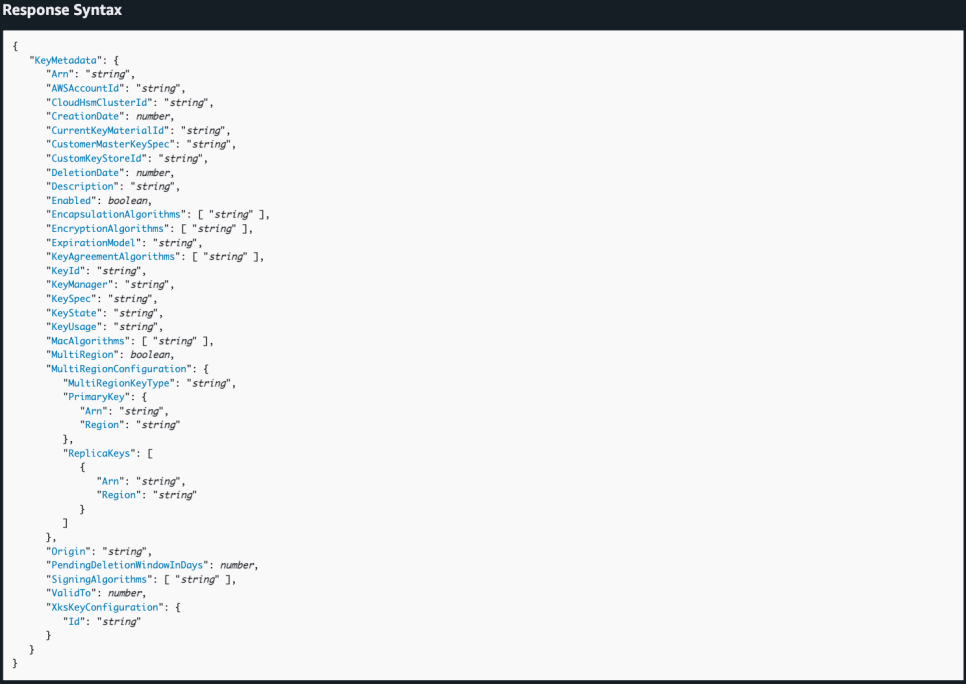
4. 🟦 DescribeKey 응답 Response 전문 :

    HTTP/1.1 200
    Content-type: application/json

    {
        "KeyMetadata": {
            "Arn": "string",
            "AWSAccountId": "string",
            "CloudHsmClusterId": "string",
            "CreationDate": number,
            "CurrentKeyMaterialId": "string",
            "CustomerMasterKeySpec": "string",
            "CustomKeyStoreId": "string",
            "DeletionDate": number,
            "Description": "string",
            "Enabled": boolean,
            "EncapsulationAlgorithms": [ "string" ],
            "EncryptionAlgorithms": [ "string" ],
            "ExpirationModel": "string",
            "KeyAgreementAlgorithms": [ "string" ],
            "KeyId": "string",
            "KeyManager": "string",
            "KeySpec": "string",
            "KeyState": "string",
            "KeyUsage": "string",
            "MacAlgorithms": [ "string" ],
            "MultiRegion": boolean,
            "MultiRegionConfiguration": {
                "MultiRegionKeyType": "string",
                "PrimaryKey": {
                    "Arn": "string",
                    "Region": "string"
                },
                "ReplicaKeys": [
                    {
                    "Arn": "string",
                    "Region": "string"
                    }
                ]
            },
            "Origin": "string",
            "PendingDeletionWindowInDays": number,
            "SigningAlgorithms": [ "string" ],
            "ValidTo": number,
            "XksKeyConfiguration": {
                "Id": "string"
            }
        }
    }

    --------------------------------------------------

    KeyId : KMS 키의 고유 ID

    Arn : 키의 전체 ARN

    Enabled : 키 사용 가능 여부

    KeyState : 현재 키 상태

      - Enabled : 사용 가능
      - Disabled : 비활성화
      - PendingDeletion : 삭제 대기
      - PendingImport : Import 대기
      - Unavailable : 사용할 수 없음

    KeyUsage : 키 사용 목적

      - ENCRYPT_DECRYPT : 암호화/복호화
      - SIGN_VERIFY : 디지털 서명
      - GENERATE_VERIFY_MAC : MAC 생성/검증
      - KEY_AGREEMENT : 키 교환

    KeySpec : 알고리즘 종류

    Origin : 키 생성 방식

      - AWS_KMS : AWS KMS가 생성
      - EXTERNAL : Imported Key Material
      - AWS_CLOUDHSM : CloudHSM 기반
      - EXTERNAL_KEY_STORE : XKS 기반


5. 🟥 DescribeKey 호출 주요 에러 코드 :

  >> NotFoundException : 존재하지 않는 Key 호출 시 발생합니다.

  >> InvalidArnException : 잘못된 ARN 사용 시 발생합니다.

  >> DependencyTimeoutException : 내부 서비스 타임아웃이 발생한 경우입니다.

  >> KMSInternalException : AWS KMS 내부 오류가 발생한 경우입니다.


6. ✅ 자바스크립트 DescribeKey 사용 에제 소스 코드 :

  import {
      KMSClient,
      DescribeKeyCommand
  } from "@aws-sdk/client-kms";

  const client = new KMSClient({
      region: "ap-northeast-2"
  });

  try {

      const command = new DescribeKeyCommand({KeyId: "alias/my-key"});

      const response = await client.send(command);

      console.log("DescribeKeyCommand 성공");
      console.log(response);

  } catch (error) {
      console.error("DescribeKeyCommand 실패");
      console.error(error.name);
      console.error(error.message);
  }

// --------------------------------------------------------------------------------------


// --------------------------------------------------------------------------------------
[참고 사이트]
// --------------------------------------------------------------------------------------

▶️ [AWS 사이트 Document 참고]

https://docs.aws.amazon.com/kms/latest/APIReference/API_DescribeKey.html


▶️ 205. (TWOK/LOGIC) [Aws] 시크릿 매니저 (Secrets Manager) 와 KMS (Key Management Service) 연동 흐름 (복호화 과정) 정리

https://kkh0977.tistory.com/9213

https://blog.naver.com/kkh0977/224458160134


▶️ 36. (Aws/Amazon) [Aws Key Management Service] Aws KMS 키 관리 서비스 개념 및 설명 정리 - 데이터 암호화 키 생성 관리

https://kkh0977.tistory.com/7827

https://blog.naver.com/kkh0977/223793790135?trackingCode=blog_bloghome_searchlist


▶️ 961. (Android/Java) [간단 소스] AccessKey , SecretKey 사용해 Aws KMS 키 관리 서비스 AWSKMSClient 초기화 방법

https://kkh0977.tistory.com/7841

https://blog.naver.com/kkh0977/223799656979?trackingCode=blog_bloghome_searchlist


▶️ 962. (Android/Java) [유틸 파일] getAwsKmsEncode - Aws KMS 데이터 암호화 수행 - Aws Kms Data Encode

https://kkh0977.tistory.com/7843

https://blog.naver.com/kkh0977/223801128528?trackingCode=blog_bloghome_searchlist


▶️ 963. (Android/Java) [유틸 파일] getAwsKmsDecode - Aws KMS 데이터 복호화 수행 - Aws Kms Data Decode

https://kkh0977.tistory.com/7844

https://blog.naver.com/kkh0977/223801135950?trackingCode=blog_bloghome_searchlist


▶️ 35. (Aws/Amazon) [Aws Secrets Manager] Aws 시크릿 매니저 개념 및 설명 정리 - 보안, 인증 관리

https://kkh0977.tistory.com/7826

https://blog.naver.com/kkh0977/223793783052?trackingCode=blog_bloghome_searchlist

// --------------------------------------------------------------------------------------DescribeKey - AWS Key Management Service
In the following list, the required parameters are described first.
docs.aws.amazon.com
https://blog.naver.com/kkh0977/224458160134
205. (TWOK/LOGIC) [Aws] 시크릿 매니저 (Secrets Manager) 와 KMS (Key Management Service) 연동 흐름 (복호화 과정)
[로직 정리] 구 분 : 투케이2K / 개발 / IT / 컴퓨터 / 개발자 정리 로직 : AWS / Secrets Manager...
blog.naver.com
https://blog.naver.com/kkh0977/223793790135?trackingCode=blog_bloghome_searchlist
36. (Aws/Amazon) [Aws Key Management Service] Aws KMS 키 관리 서비스 개념 및 설명 정리 - 데이터 암호화 키
[개발 환경 설정] 개발 환경 : Aws / Amazon Web Services [설명 정리] [참고 사이트] https://docs.aw...
blog.naver.com